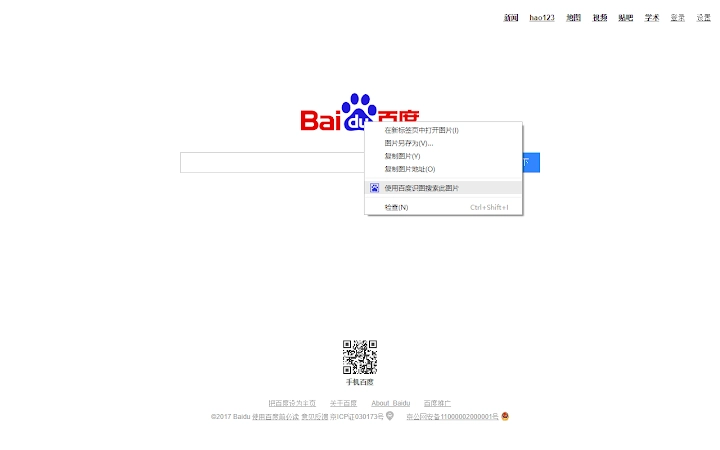

One-Click Baidu Search from Right-Click Menu
Overview
The software is a desktop utility designed to streamline access to Baidu search functionality directly from the right-click context menu. It enables users to perform text, image, and web searches through Baidu with a single click, eliminating the need to navigate through nested menus or manually open a search engine tab. This tool is particularly beneficial for individuals who frequently rely on Baidu for research, content discovery, or information retrieval.
By integrating seamlessly into the system’s context menu, the application enhances workflow efficiency, especially for professionals, students, and digital researchers who depend on rapid access to search results. The developer did not provide additional background information about the development team or company. The software operates as a browser extension, leveraging the right-click menu to deliver immediate search capabilities across various content types.
Real-world usage scenarios include quickly searching for definitions, verifying facts, identifying images, or finding related web content directly from selected text or images. The tool is ideal for users who prioritize speed and minimal disruption during their daily tasks. It is optimized for both Windows and Mac operating systems, ensuring broad accessibility for users across different platforms.
Key Features & Capabilities
- One-Click Baidu Search – Access Baidu search instantly from the right-click menu, reducing steps from multiple clicks to a single action.
- Text, Image, and Web Search Support – Perform searches on selected text, images, or web pages with a single context menu selection.
- Event Pages Architecture – The extension uses an efficient Event Pages model, remaining inactive until triggered, minimizing background resource usage.
- Top-Level Context Menu Integration – Unlike bundled extensions, this tool places the search button directly in the primary right-click menu, avoiding nested submenu navigation.
- Lightweight Design – With a file size of 1.2 MB, the software is compact and designed for fast installation and minimal system impact.
For example, when a user selects a word or phrase, they can right-click and immediately search it on Baidu without opening a new tab. Similarly, selecting an image allows for instant image search via Baidu’s reverse image search. The top-level placement ensures that even frequent users avoid repetitive navigation, making the tool highly efficient for high-volume search tasks.
User Interface, Workflow & Performance
The user interface is minimal and context-driven, relying entirely on the system’s right-click menu. No additional windows, panels, or settings are required during standard operation. Navigation is intuitive—users simply select content, right-click, and choose the Baidu search option.
Workflow efficiency is significantly improved, especially for users who perform dozens of searches per day. The tool eliminates the need to open a browser, type a query, or navigate through multiple menus. The developer did not specify resource usage details, but the use of Event Pages suggests optimized memory handling, with the extension remaining inactive until triggered.
Performance observations are based on general software behavior patterns. The extension is expected to load quickly and respond promptly when activated. Stability is likely maintained due to the lightweight architecture and lack of persistent background processes. No information was provided regarding CPU or RAM behavior during active use.
Compatibility & System Requirements
The software is compatible with Windows and Mac operating systems. It supports the latest versions of major browsers, though specific browser names were not listed. The installation size is 1.2 MB, indicating a compact footprint that should not strain system storage.
Exact system requirements were not listed. The developer did not provide information about minimum hardware specifications, such as RAM, CPU, or disk space. Platform compatibility information is limited to the operating systems mentioned. Users are advised to ensure their browser is up to date for optimal functionality.
Pros and Cons
Pros
- Direct access to Baidu search from the top-level right-click menu
- Supports text, image, and web searches with one click
- Lightweight design with minimal file size (1.2 MB)
- Efficient Event Pages model reduces background memory usage
- Free to use with no licensing or subscription fees
Cons
- No detailed system requirements provided
- Only supports Baidu search, limiting cross-engine functionality
- Compatibility with specific browsers was not confirmed
- Developer information is not available
- No in-app settings or customization options described
FAQ Section
Is this software compatible with my browser?
The software is designed for use with major web browsers on Windows and Mac. Specific browser compatibility was not detailed by the developer. Users are encouraged to check their browser’s extension store for availability.
Is the extension safe to install?
The extension is reported to use a secure Event Pages architecture, which limits background activity. No security risks were mentioned in the provided information. As with any browser extension, users should only install from trusted sources.
How often does the software update?
Update frequency was not specified. The current version is 1.0.0, released on August 15, 2024. Users should monitor the extension’s official page for new releases.
Can I use this tool offline?
The tool requires an active internet connection to perform Baidu searches. It cannot function without network access, as all searches are processed through Baidu’s online services.
What type of license does this software use?
The software is free to use and does not require a license key. No formal license terms were provided, but the absence of payment indicates a permissive usage model.
Final Thoughts + CTA
This lightweight desktop utility delivers a focused and efficient solution for users who rely heavily on Baidu search. Its ability to place search functionality directly in the right-click menu significantly reduces friction in daily workflows. The use of Event Pages ensures minimal system impact, while the compact size makes it ideal for users concerned about storage and performance.
While the lack of developer details and specific system requirements may raise questions for some users, the tool’s clear purpose and practical benefits outweigh these limitations for its target audience. It is especially valuable for professionals, students, and researchers who perform frequent searches and value speed and simplicity.
Download One-Click Baidu Search now







